Every cold email tool has a spam word list somewhere. A page of words to avoid: free, guarantee, act now, limited time. You read it once, nod, and go back to writing emails that say "no obligation" in the third line because that is how the sentence came out.
The list is not the problem. The problem is that nobody runs the list against the draft they are about to send, at the moment they are about to send it. So we put a cold email spam checker where the draft is: under the editor, one click, with the verdict rendered onto your text.
It is called Copy check, and it is live in FoxReach today on every sequence step, every A/B variant and every email template.
What it does
Click Check copy and the panel answers with five things:
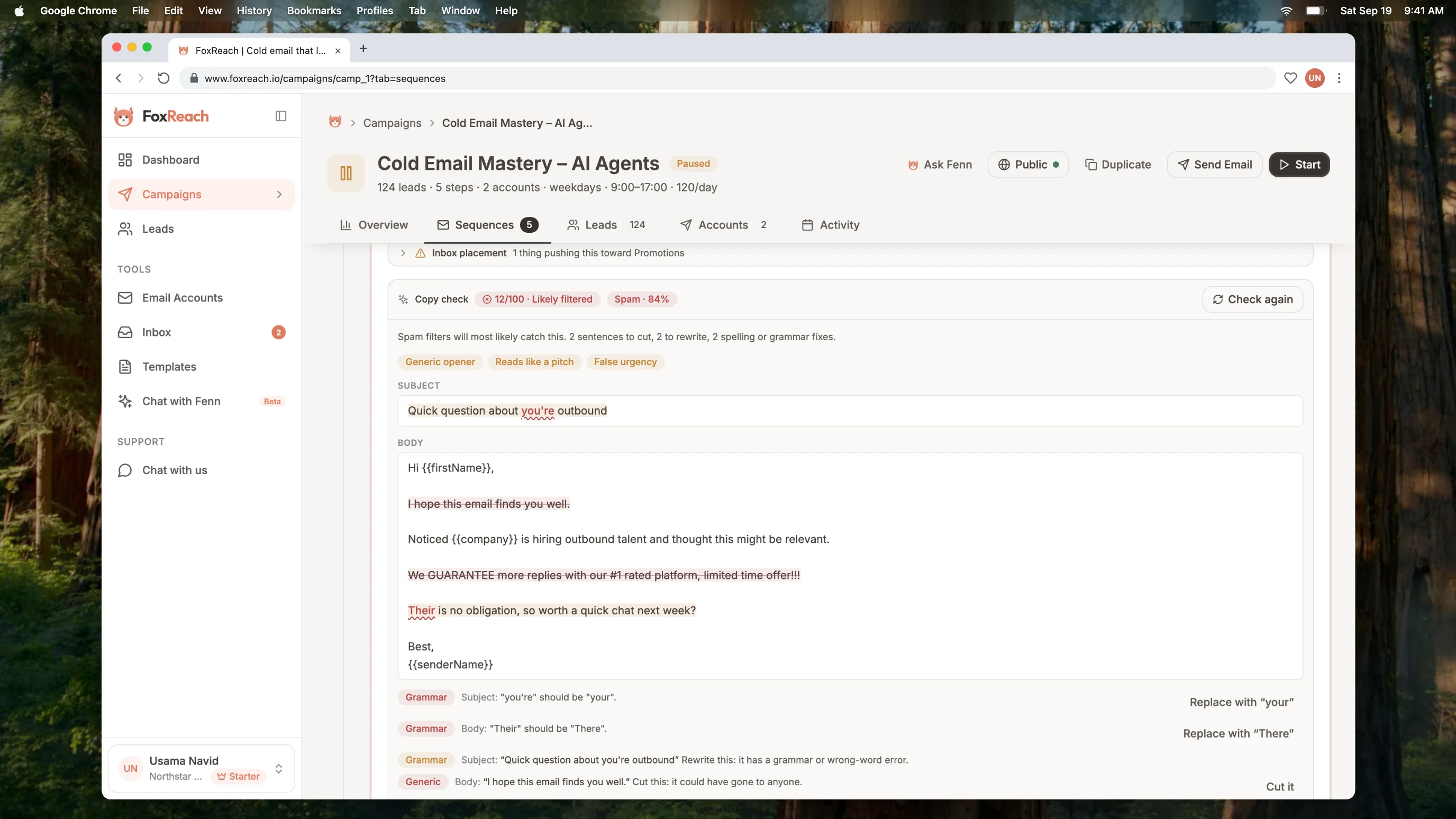
An inbox score from 0 to 100, with a label: Should land, Mostly fine, Borderline, or Likely filtered.
The folder it predicts for the email as written: Primary inbox, Promotions, or Spam, and how sure it is. A draft that comes back "Spam, 84%" is not a draft you argue with.
Signals, the problems with the email as a whole rather than with any one line. Reads like a pitch. False urgency. Generic opener. Not tailored to the reader. Too long. No single clear ask. Looks like a template blast.
The sentences to cut or rewrite, highlighted in the text. A sentence to cut is struck through in red. One to rewrite is shaded amber. Hover it and the reason is there: spam trigger, salesy, false urgency, formatting, link, generic, too long, grammar.
The words that are wrong, with a wavy underline. Real typos, and the real-word errors a spell checker misses: their and there, your and you're, its and it's. Where the correction is unambiguous, there is a button that applies it.
The ten-second fix loop
Here is the draft from the screenshots. Subject: "Quick question about you're outbound." Body: a "hope this email finds you well" opener, a line about a guaranteed result from a number-one-rated platform with a limited time offer and three exclamation marks, and "Their is no obligation" before the ask.
Copy check scores it 12. Spam, 84% sure. Three signals: generic opener, reads like a pitch, false urgency. Two sentences to cut, two to rewrite, two grammar fixes.
Under the highlighted text is a row per problem with a button where one applies. "Replace with your." "Replace with There." "Cut it" on the filler opener. "Cut it" on the hype line. Four clicks. Each one edits the draft and updates the highlights, so the next fix is still where the panel said it was.
Re-check. 92, Primary inbox, 91%. Nothing to change.
The email that went from 12 to 92 says the same thing. It just stopped saying it the way a marketing blast does. That is most of what deliverability at the copy level is: not clever writing, just the removal of the things that make a filter, or a person, stop reading.
Why a decision model, not a chat model
We built the first version on a chat model with a JSON schema: send the draft, get back a list of problems and rewrites. It worked, mostly. It also took ten to seventeen seconds, cost a few cents per check, and every so often came back with a quoted span that was not in the email, or a suggestion written in a voice that was not yours.
The version we shipped runs on a different kind of model. TypeSafe's Jev is what they call a System One model: it does not generate text at all. You give it the email and a set of typed questions, and it answers each one with a probability. Where will this land: inbox, Promotions, or spam? On a five-step scale from "reads like spam" to "short personal note, will land," where does this sit? Is this sentence fine, should it be cut, or should it be rewritten? Is this word wrong here? Should "their" be their, there, or they're?
We reach it through OpenRouter, and a full check on a six-sentence email, forty-odd questions, comes back in about a second for a fraction of a cent.
That shape has consequences we like. The score is a real probability, not a number a model made up to sound decisive. A flagged word is always a word that is actually in your draft, because the model never quotes text, it only answers questions about spans we found deterministically. And the model cannot rewrite your email, which sounds like a limitation until you remember that the rewrites from the chat version were the part people trusted least.
The trade is that replacements only exist where the answer is a choice from a known set. "Their" to "There" is a choice. Spelling "receive" from "recieve" is not, so that gets flagged with "check the spelling of" and left to you. We think that is the right side of the line for a tool that sits between you and the send button.
When the fix is a rewrite, not a cut
Cuts and word swaps cover the mechanical problems. The sentence Jev marks rewrite is the harder one: it has to say the same thing in a way that does not trip the filter, and no decision model can write that.
So for those we bring in ChatGPT, on a leash. Click Rewrite with AI on the row and GPT writes one replacement under strict rules: plain, no hype, no urgency, every personalization variable kept exactly, same meaning or shorter. Then Jev reads the replacement in the context of the whole email and answers two questions: would it keep this sentence, and does it read like a template? Only a yes and a no get you the "Suggested rewrite, checked" card. A rejected attempt gets one retry with Jev's objection in the prompt; a second rejection is reported as such, not papered over.
When the problem is the whole email rather than a line, Improve draft with AI does the same at full size: GPT rewrites the subject and body, Jev scores the result, and you see it next to your current score with Use this version, Try again, or Keep mine. A rewrite that scores lower than yours says so. Nothing replaces your draft until you click.
Two rules we learned the first hour. One: GPT likes to rename merge tags, {{firstName}} to {{first_name}}, which looks harmless and silently breaks a custom field. Any tag not in the original is now rejected before you see it. Two: GPT's default voice is polished, and polished reads as marketing. The prompt carries the voice rules, and Jev's "reads like a template" question is the backstop for the rest.
These two actions cost one AI credit each, the same as Fenn and the HTML generator. The check itself stays free.
What it checks against
Copy check is tuned for one-to-one cold email sent from a real person's mailbox. It weighs what Google's email sender guidelines and Gmail's own explanation of why messages get marked as spam say the filters weigh, and what a busy reader gives up on:
| It flags | Examples |
|---|---|
| Spam trigger words and patterns | free, guarantee, act now, no obligation, 100%, $$$ |
| Hype and pitch-first phrasing | #1, leading, best-in-class, the pitch before any relevance |
| False urgency | limited time, before it's gone, a deadline that is not real |
| Formatting that looks like a blast | ALL CAPS, runs of exclamation marks, emoji |
| Links | bare or shortened URLs, "click here" |
| Generic filler | I hope this email finds you well |
| Length | more than a busy reader will finish |
| Spelling and grammar | typos, their and there, your and you're, its and it's |
It does not flag personalization variables or spin syntax, both of which it understands as template syntax. It does not flag British against American spelling, product names or a casual tone. It is not a grammar pedant; it is looking for the things that cost replies.
And it does not judge your list, your volume or your domain reputation. Those decide inbox placement at least as much as the words do, and no copy checker can see them. Warmup, verification and pacing are the rest of the job, and FoxReach does those too. Copy check removes the part of the risk that lives in the copy, which happens to be the part you can fix in ten seconds.
Where to use it
Before you launch a sequence. Run it on every step. Follow-ups drift toward pushy in a way first emails do not; "just bumping this" and "did you see my last email" both score badly, and for good reason.
Before you A/B test. A variant that scores 30 against a control that scores 85 is not a test of the idea, it is a test of the spam filter. Get both variants into the same band, then let the A/B test tell you which idea wins.
On templates. The panel is in the template editor, so a template can be checked once and loaded into steps clean.
On anything Fenn wrote. Fenn, the AI co-pilot, will draft a sequence from a sentence. Copy check is the second opinion on the result, and Improve draft with AI is the third: Fenn drafts, Jev grades, GPT fixes, Jev grades again.
The details
A check is free and does not use AI credits, on every plan including Free. Under the hood it costs us a fraction of a cent, and a tool that sits between you and the send button should not make you count. Fenn and the HTML generator still draw from the monthly credit pool; what each plan includes is on the pricing page.
It is advisory. Nothing in it blocks a save or a send. The score is the model's read, not a promise; use it to remove obvious risk and compare drafts, and use reply rate, the number that actually pays, to judge the campaign.
The full walkthrough, with every screen, is in the docs: Check cold email copy for spam triggers and typos. If you already have a campaign in FoxReach, open a step and click Check copy. If you do not, start free and paste in the draft you were about to send. It probably scores better than the one in the screenshots. It might not.