

What an A/B test is in FoxReach
A campaign sequence is a list of steps: step one is the first email, steps two and beyond are follow-ups. Normally each step has one subject line and one body. An A/B test replaces that single version with two or more variants. Each variant has:- Its own subject line and body (personalization variables and spin syntax both work inside variants)
- Its own send-as-HTML setting
- A weight, which is a whole number that controls how much of the traffic it gets
Step 1: Pause the campaign
Sequence steps and their variants are locked while a campaign is active, so the first move is to pause. Open the campaign and use the pause control at the top of the page. Nothing is lost by pausing. Leads mid-sequence hold their place, and when you resume, the schedule picks up where it left off. If you are building a new campaign that has not launched yet, it is still in draft and you can skip this step.Step 2: Add the test to a step
Open the Sequences tab. Each step is a card showing its subject and a preview of the body. At the bottom of the card, click Add A/B Test.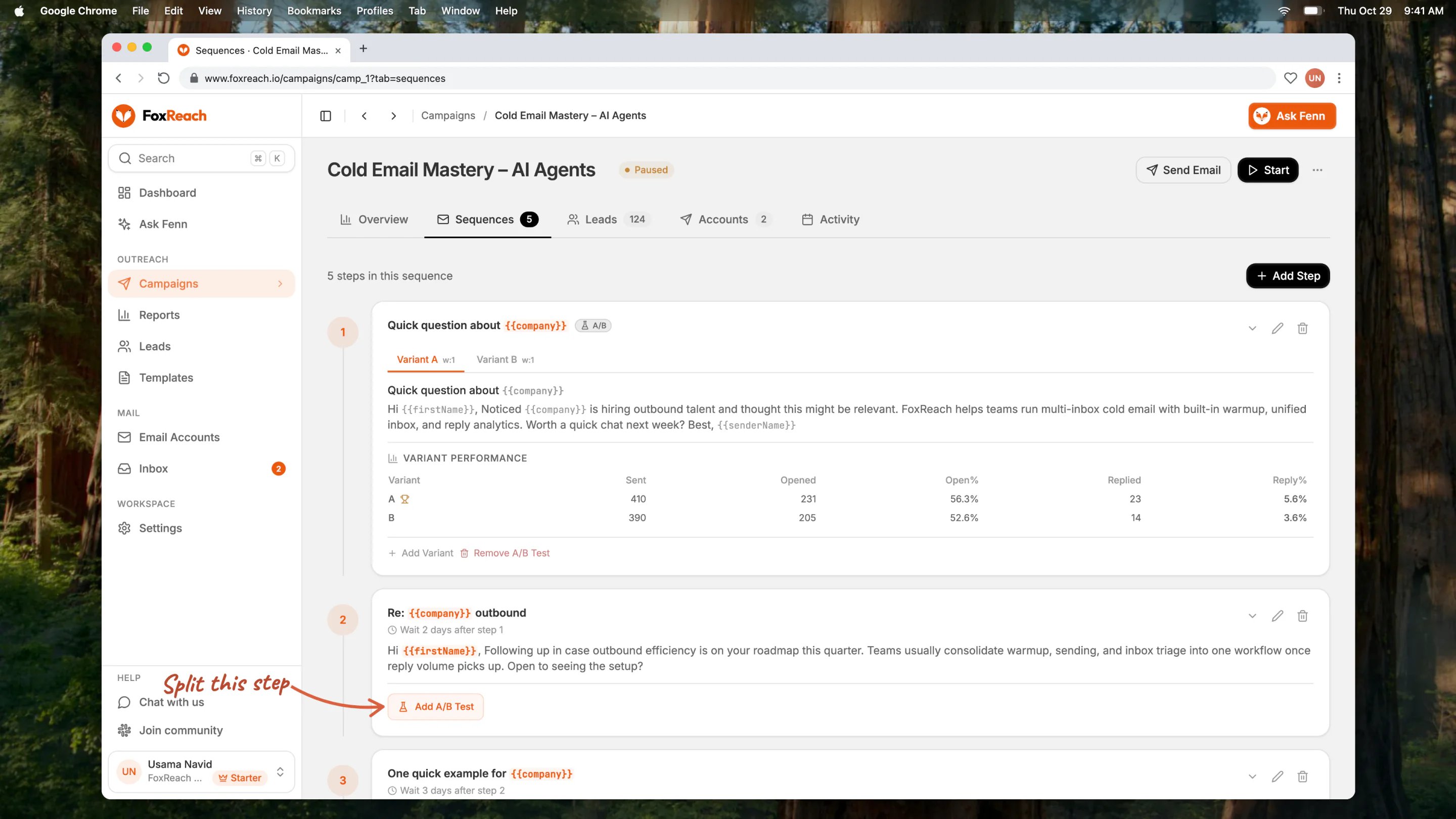
The Add A/B Test button on a sequence step in FoxReach
- Variant A is a copy of what the step already had. Your current subject and body are preserved exactly.
- Variant B is a second copy of the same content, ready for you to edit.
Step 3: Edit the variants
The step now shows a tab per variant. Click Variant B to edit it. Change the subject line, the body, or both, then save.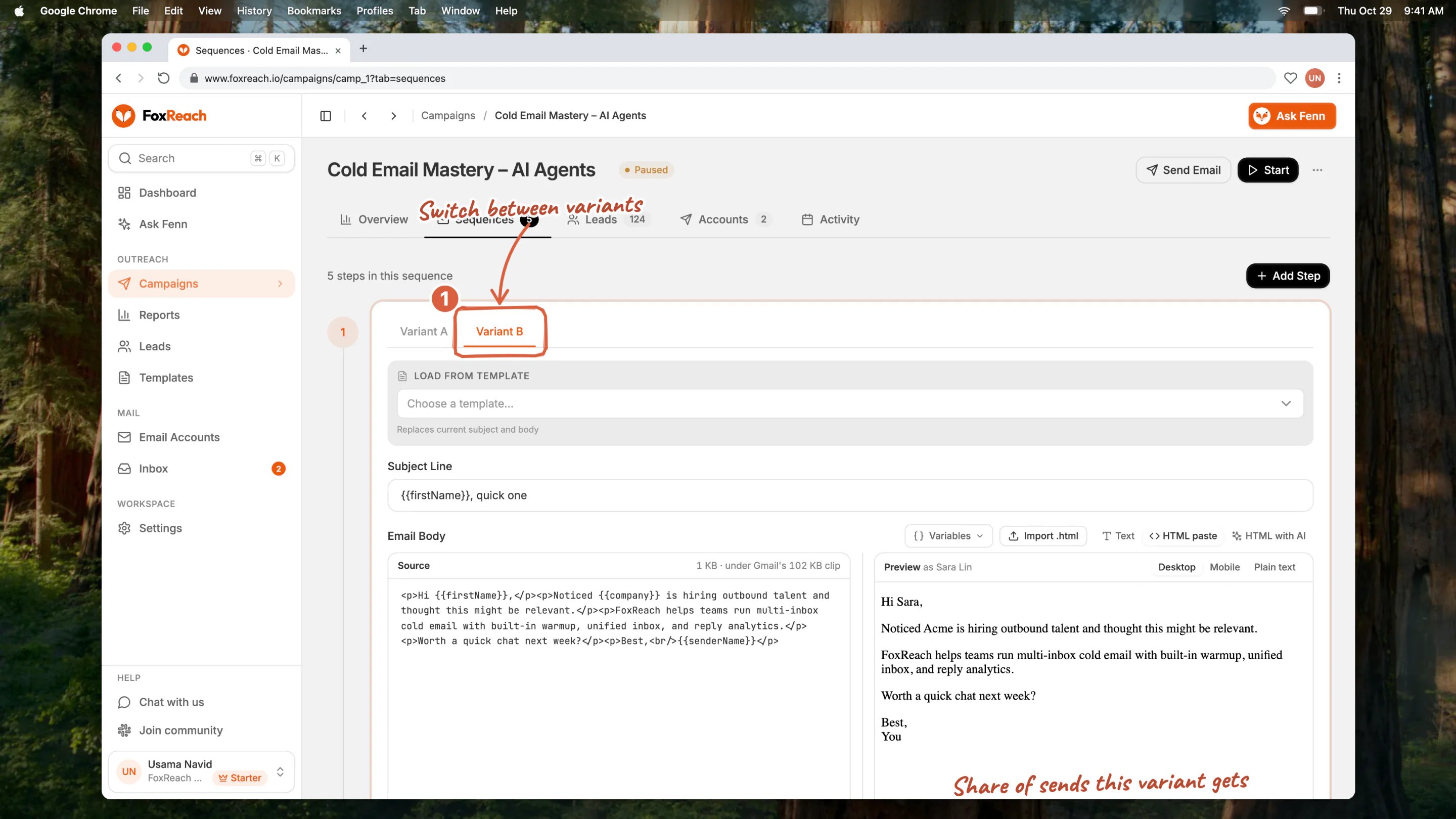
Editing variant B with its own subject line and body
{{company}} with no fallback that would leave a blank in the email. Set fallbacks with the pipe syntax, for example {{company|your team}}, and check both renders.
Need a third variant? Click Add Variant and FoxReach creates variant C as another copy of the step. Keep it to two or three. More variants means more traffic needed before any of them reaches a readable sample size.
Step 4: Set the weights
Each variant has a Weight field. It is a whole number, minimum 1, and the split is proportional. A few useful shapes:
For a first test on a step, leave it at 50/50. Uneven weights make sense once you have a proven control and want to check a challenger without giving it half of your sends.
Save the weights, then resume the campaign.
What to test at each step
The most useful tests change depending on where the step sits in the sequence. Step one: subject line. The first email’s job is to get opened, and the subject line is most of that. Test a short specific subject against a question, or a lowercase internal-looking subject against a formal one. Keep the body identical. Step two: the angle. By the second touch the reader has seen your name once. Test a different reason to reply: a case study versus a pain-point question, or a short bump versus a new piece of value. Keep the subject the same so the thread stays clean. Last touch: the ask. The final email is where a softer or harder close changes behavior. Test “worth a quick call?” against “should I close the loop?” or a permission-based ask against a direct one. The cold email copywriting module in the academy goes deeper on writing the variants themselves. The point here is that each step is its own test, so run one per step and do not stack three changes into one email.Step 5: Read the results
Once the campaign has been sending, expand the step and open Variant Performance. It is a table with a row per variant:
FoxReach highlights the variant with the best reply rate.
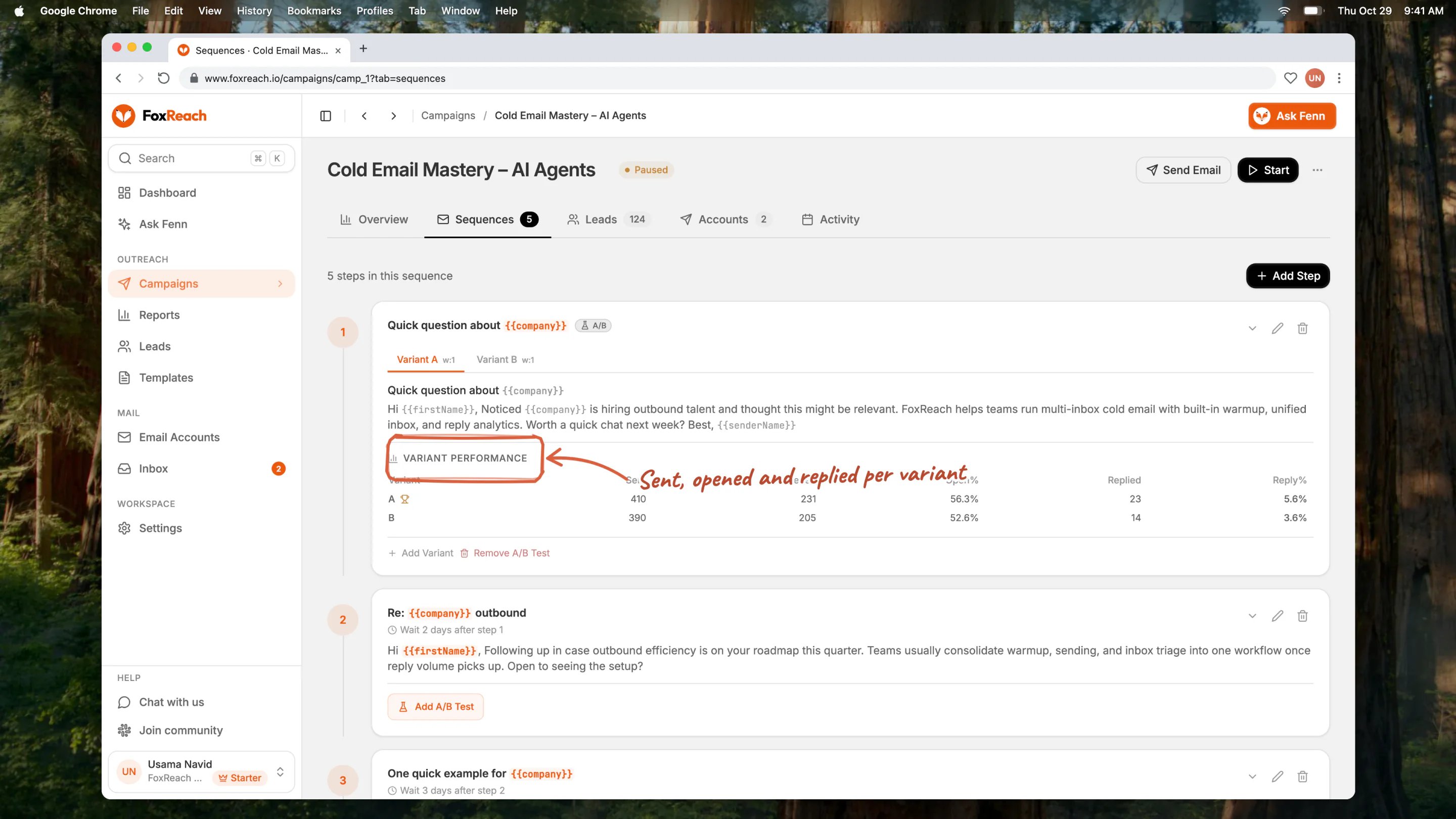
The Variant Performance table showing sent, open, and reply rates per variant
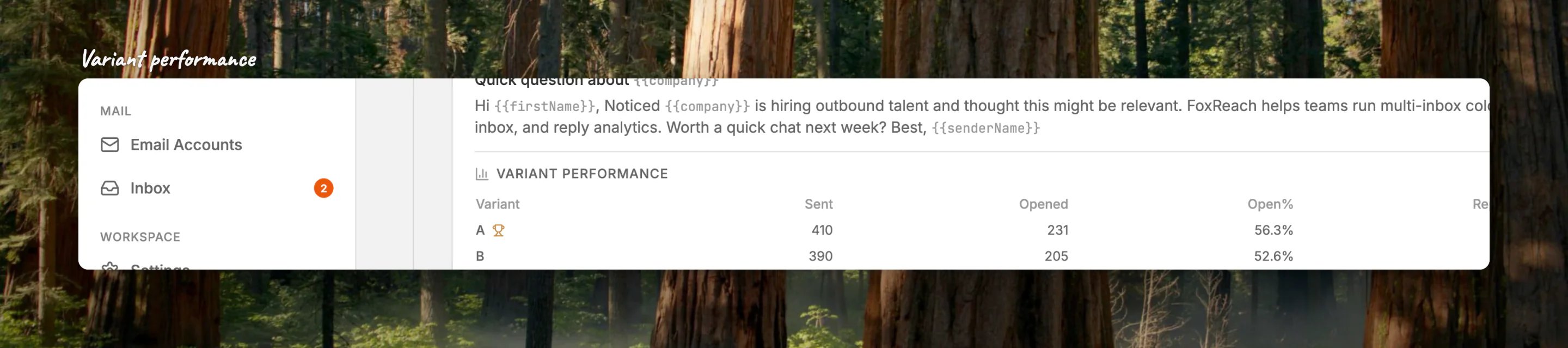
Close-up of the Variant Performance table: sent, opened and replied counts and rates for variants A and B
Step 6: Promote the winner
FoxReach does not pick a winner for you. When you have a clear result, you have two options. Shift the weights. Pause, set the winner to weight 9 and the loser to weight 1, resume. The winner gets 90 percent of sends while you keep collecting a small amount of data on the loser. This is the safest move and takes ten seconds. Promote and remove the test. Pause, copy the winner’s subject and body into the step itself (edit the step, paste, save), then click Remove A/B Test and confirm. All variants are deleted and the step sends your pasted content to everyone. Do the copy step first: removing the test restores whatever the step had before the test started, which is the original control, not the winner. Then start the next test. The steps that have not been tested yet are waiting.Practical notes
Changes apply to every email not yet sent. The variant is picked at the moment each email goes out, not when it is scheduled. Change the weights or the copy and every send from that point on, including ones already on the calendar, uses the new setup. Removing the second-to-last variant ends the test. A test needs at least two variants. If you delete variant B on a two-variant step, FoxReach also removes A and returns the step to single mode. Duplicating a campaign copies the variants. If you duplicate a campaign to reuse the sequence for a new list, the A/B setup comes with it, including weights. Reset the weights to 50/50 if you want a fresh test. Spin syntax is not an A/B test. Writing{Hi|Hello|Hey} rotates words to reduce sameness across sends, which is good for deliverability. It does not track which spin won. Use variants when you want to learn something, and spin syntax when you want to vary without measuring.
Deliverability comes first. A subject line that wins on replies but lands more emails in spam is not a winner. If you change your approach after a test, keep an eye on bounce rate and reply rate over the following week. The deliverability guide covers what to watch.
A worked example
A campaign to 800 heads of sales. Step one is a 50/50 test of two subject lines:- A: “question about outbound at
{{company}}” - B: “
{{first_name}}, quick one”
Frequently asked questions
How does A/B testing work in FoxReach?
How does A/B testing work in FoxReach?
Any step in a campaign sequence can be split into variants. Each variant has its own subject line, body, and a weight. When FoxReach sends that step to a lead, it picks one variant at random in proportion to the weights, records which variant went out, and attributes every open and reply back to it. The Variant Performance table under the step shows sent, opened, and replied counts and rates per variant.
Can I A/B test follow-up emails, not just the first email?
Can I A/B test follow-up emails, not just the first email?
Yes. Every step in the sequence is tested independently. You can run a subject line test on step one, a body copy test on step two, and a call-to-action test on the last touch at the same time. Each lead gets one variant per step, chosen separately at each step.
How many emails do I need before I can trust an A/B test result?
How many emails do I need before I can trust an A/B test result?
Treat anything under about 100 sends per variant as noise. Reply rates in cold email are usually between two and ten percent, so a difference of one or two replies swings the percentage a lot on small samples. Let the test run until each variant has at least 100 sends, and ideally 200 or more, before acting on the difference.
Does FoxReach automatically pick the winning variant?
Does FoxReach automatically pick the winning variant?
No. FoxReach highlights the variant with the best reply rate but leaves the decision to you. To promote a winner, either shift the weights so the winner gets most of the traffic, or copy the winner’s subject and body into the step and remove the A/B test so the step sends that content to everyone.
Can I edit an A/B test while the campaign is running?
Can I edit an A/B test while the campaign is running?
Sequence steps and their variants are locked while a campaign is active. Pause the campaign, make your changes to the variants or weights, and resume it. The variant is chosen at the moment each email is sent, so every email that has not gone out yet, including ones already scheduled, uses the updated variants and weights.