

Why connect them
Stop copying contacts by hand. Every time a new contact enters GoHighLevel, whether from a form, a call, or a pipeline stage change, it can land in a FoxReach cold email campaign automatically. No CSV exports, no copy-paste, no missed leads. Close the loop on replies. When someone replies to a cold email in FoxReach, that reply can trigger a tag, a pipeline move, or a task in GoHighLevel. Your sales team sees the warm lead in their CRM without logging into a second tool. One system of record. GoHighLevel stays your CRM. FoxReach stays your outbound engine. Each does what it does best, and the middleware keeps them talking.Three ways to connect them
Option 1: Middleware (recommended, no code)
This is the fastest and easiest path. FoxReach has a published n8n community node (n8n-nodes-foxreach, currently in beta). Zapier and Make apps are listed as Planned on the integrations page, so on those two platforms you use the generic HTTP module to call the FoxReach API and a custom webhook trigger to receive FoxReach events, instead of a FoxReach-branded app. GoHighLevel has official apps on all three. Either way, you connect the two inside the middleware platform without writing any code.
GoHighLevel to FoxReach (send cold outreach):
- GoHighLevel trigger: new contact created, tag added, or pipeline stage changed
- FoxReach action: create lead, then add lead to campaign (in n8n: Lead > Create, then Campaign > Add Lead)
- Result: the contact drops straight into a running cold email sequence
- FoxReach trigger: reply received, reply categorized, or email bounced (the n8n trigger node lists all eleven FoxReach events)
- GoHighLevel action: create or update contact, add tag, move pipeline stage
- Result: warm replies appear in your CRM automatically
otr_ key that you create in your dashboard. To set up your FoxReach API key, go to Settings > Integrations > API Keys. GoHighLevel uses its own API key or OAuth. The middleware handles the rest.
Make is the most flexible of the three. Its HTTP app has a Make a request module that lets you call any API endpoint, which is what you use for the FoxReach side today.
Option 2: Direct API (more control, some setup)
If you want more control or your middleware does not cover a specific use case, you can connect the two platforms directly through their APIs. FoxReach has a public REST API athttps://api.foxreach.io/api/v1. Authentication uses the X-API-Key header with your otr_ key. You create the key in your FoxReach dashboard under Settings > Integrations > API Keys (the API keys and webhooks tutorial shows the exact screens). For the full API reference, see the API documentation.
GoHighLevel workflows have an outbound Custom Webhook action where you set the method, URL, headers, and body. From a GoHighLevel workflow, you would POST to /api/v1/leads to create a lead, then POST to /api/v1/campaigns/{id}/leads to add that lead to a campaign. Include the X-API-Key header with your FoxReach key.
The rate limit is 100 requests per minute per key. For most use cases, this is more than enough.
FoxReach uses theX-API-Keyheader, notAuthorization: Bearer. This is a common mistake when setting up the Custom Webhook action in GoHighLevel. Use theX-API-Keyheader with yourotr_key and it will work.
Option 3: Webhooks (events from FoxReach to GoHighLevel)
FoxReach fires outbound webhooks when things happen in the platform. You can point these at a GoHighLevel Inbound Webhook trigger to push FoxReach events into your CRM automatically. To configure webhooks, go to Settings > Integrations > Webhooks in your FoxReach dashboard, click Add Webhook, enter the Endpoint URL, and tick the events under Events to subscribe. Available webhook events:reply.receivedreply.categorized(with the category’s confidence and the reply’s intents, so a flow can branch on “wants a call” or “mentions pricing”)email.sentemail.failedemail.bouncedemail.opened,email.clickedcampaign.started,campaign.paused,campaign.completedlead.created,lead.updated
id, type, payload, and timestamp. Deliveries are signed with HMAC-SHA256 so you can verify they came from FoxReach: the X-Webhook-Signature header carries the hex digest of the raw request body, computed with the signing secret shown once when you create the webhook. X-Event-Type and X-Event-Id headers are included as well. If your endpoint does not answer with a 2xx, FoxReach retries after 60 seconds and again after 120 seconds, and disables the webhook after ten consecutive failed deliveries.
Note:email.openedandemail.clickedonly fire for campaigns that have Track opens and Track link clicks switched on in the campaign settings. FoxReach adds the open pixel from the second step of a sequence onwards, never on the first cold email, so do not expect open events from step one.
Step by step: connecting with Make (recommended path)
Step 1: Get your API keys
In FoxReach, go to Settings > Integrations > API Keys. Click Create API Key, name it, keep the read and write scopes selected, and copy theotr_ key from the API Key Created dialog. It is only shown once, so save it somewhere safe. You will paste it into Make in a moment.
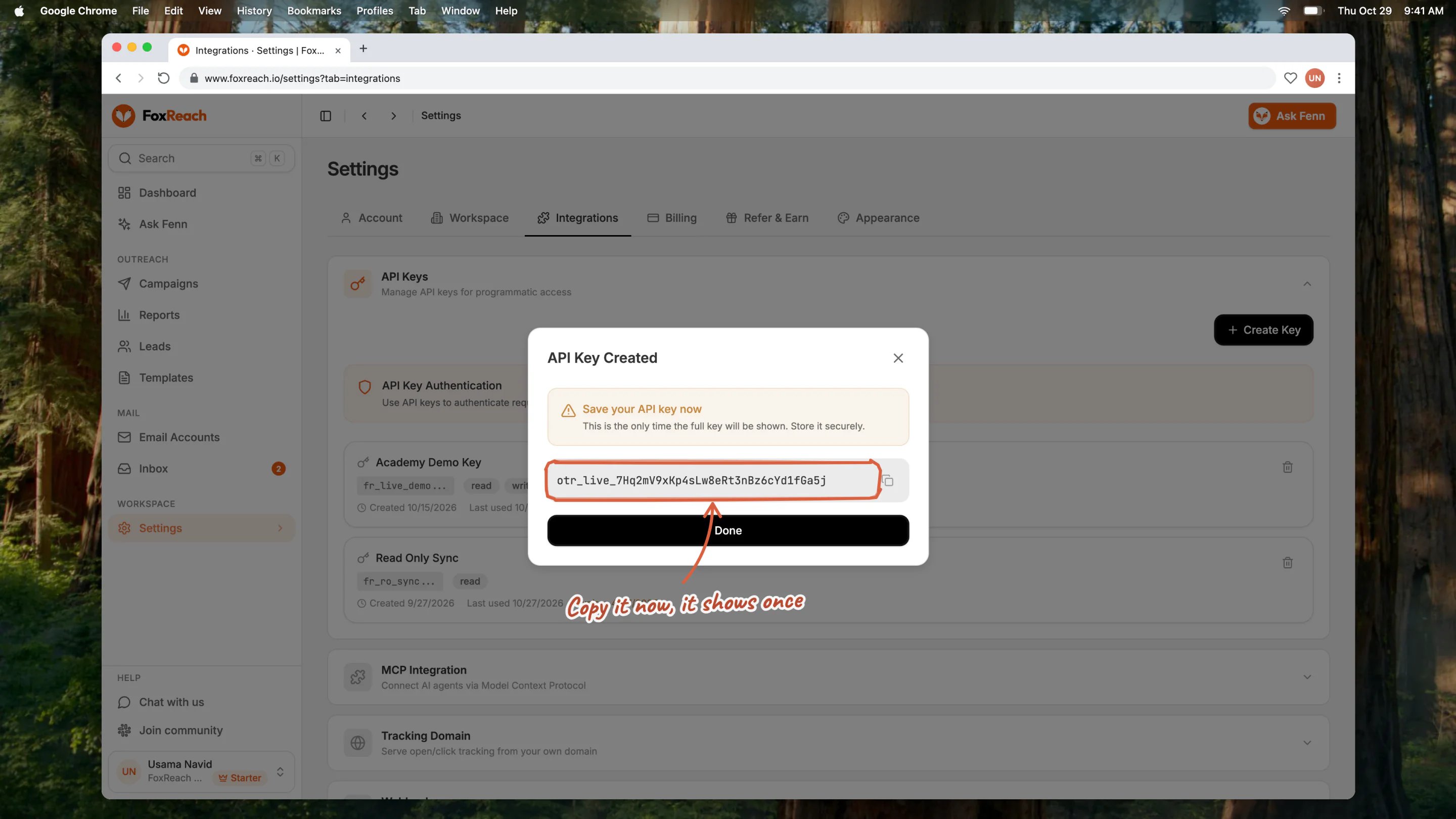
The API Key Created dialog in FoxReach under Settings > Integrations > API Keys, with the key shown once
Step 2: Create a new scenario in Make
Log into Make and create a new scenario. You will build two automations: one that sends new GoHighLevel contacts into FoxReach campaigns, and one that sends FoxReach replies back into GoHighLevel.Step 3: Build the outbound flow (GoHighLevel to FoxReach)
Add a GoHighLevel trigger module. Choose the event that should start the sequence. Common triggers:- New contact created
- Tag added (for example, a tag called “ready for outbound”)
- Pipeline stage changed (for example, moved to “cold outreach” stage)
POST, the URL to https://api.foxreach.io/api/v1/leads, add an X-API-Key header with your otr_ key, and send a JSON body that maps the contact fields from GoHighLevel (email, first name, last name, company) to the FoxReach lead fields. For the full list of available lead fields, see the Leads API reference. The response contains the new lead’s id.
Add a second HTTP > Make a request module. POST to https://api.foxreach.io/api/v1/campaigns/{id}/leads with the campaign ID in the URL and the lead ID from the previous step in the body. This drops the contact into an active cold email sequence.
Step 4: Build the inbound flow (FoxReach to GoHighLevel)
In a second scenario, add a Webhooks > Custom webhook trigger and copy the URL Make gives you. Make’s webhooks documentation explains how the module determines the data structure from the first request it receives. In FoxReach, go to Settings > Integrations > Webhooks, click Add Webhook, paste the Make URL as the Endpoint URL, and tickreply.received, reply.categorized, or email.bounced under Events to subscribe. Save the webhook, then send a test delivery from the webhook card so Make can learn the payload shape.
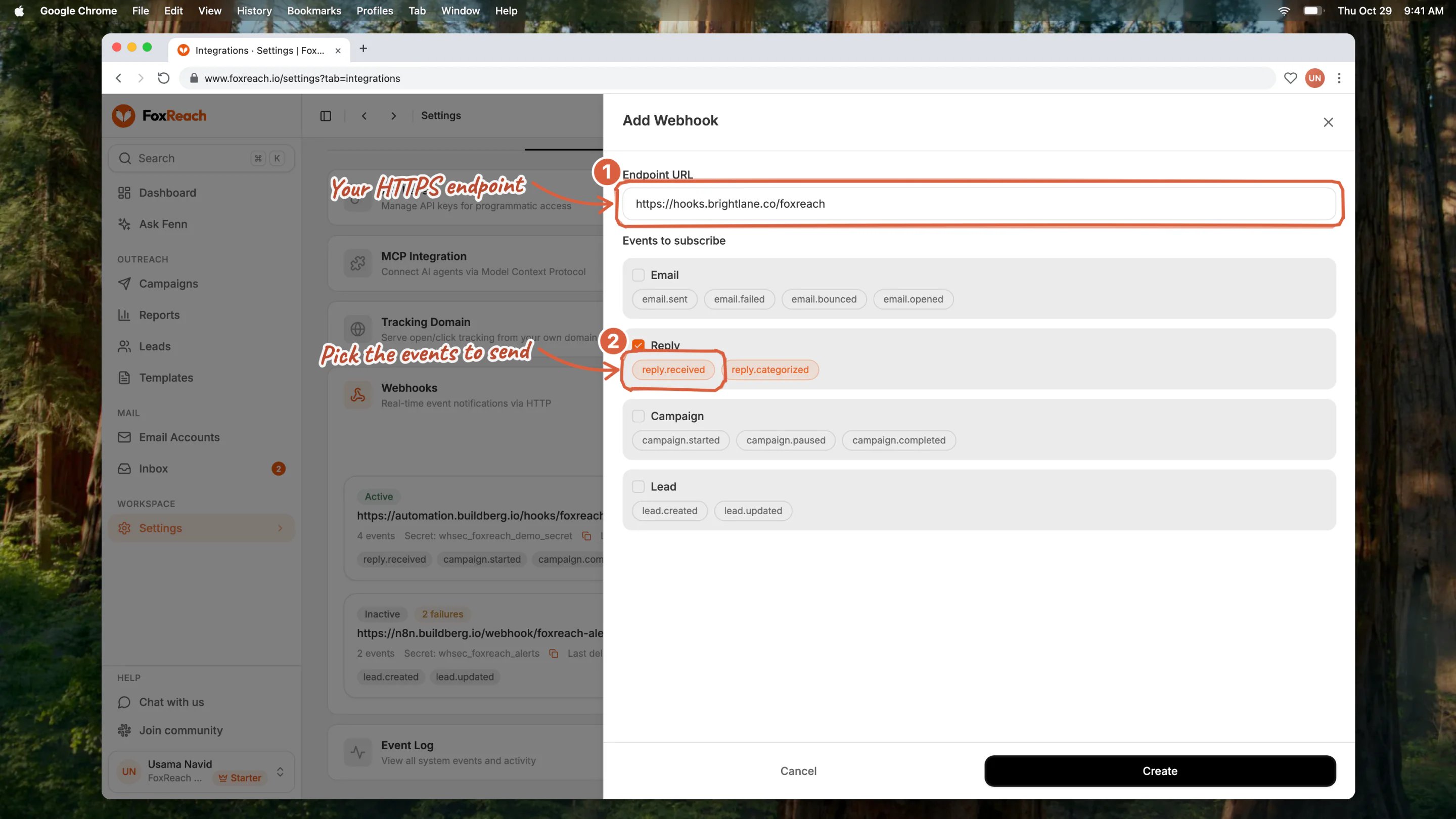
The Add Webhook sheet in FoxReach with the Endpoint URL filled in and reply events ticked under Events to subscribe
fromEmail and subject fields from the FoxReach payload back to GoHighLevel contact fields. Add a tag like “replied to cold email” so your sales team can filter for warm leads.
Optionally, add a GoHighLevel action to move the contact to a specific pipeline stage (for example, “warm lead” or “demo requested”).
Step 5: Test and activate
Run the scenario manually with a test contact. Check that the lead appears in FoxReach and that the campaign assignment works. Then send a test reply and check that GoHighLevel picks it up with the right tag and pipeline stage. Once both directions work, set the scenario to run automatically and activate it.Common flows people set up
New lead to cold outreach. A new contact enters GoHighLevel from a form or import. A tag is added (“outbound”). Make picks up the tag, creates a lead in FoxReach, and adds it to a cold email campaign. The contact starts receiving the sequence automatically. Warm reply to CRM. A prospect replies to a cold email. FoxReach fires areply.received webhook. Make picks it up and adds a “replied” tag in GoHighLevel. The sales team sees the warm lead in their pipeline and follows up.
Bounce cleanup. An email bounces in FoxReach. Make picks up the email.bounced event and adds a “bounced” tag in GoHighLevel. The contact is automatically removed from future outbound lists.
Pipeline stage trigger. A contact is moved to a “cold outreach” stage in GoHighLevel. Make creates the lead in FoxReach and adds it to the appropriate campaign based on the pipeline or tag.
A few tips
Start with one flow. Set up the GoHighLevel to FoxReach direction first. Get contacts flowing into campaigns reliably. Then add the reverse direction for replies. Do not try to build both at the same time. Use tags to control who enters outbound. Do not trigger on every new contact. Use a specific tag like “ready for outbound” in GoHighLevel so only qualified contacts enter FoxReach campaigns. This prevents accidental sends to contacts who are not ready. Watch your rate limits. FoxReach allows 100 API requests per minute per key. If you import a large batch of contacts into GoHighLevel and the middleware tries to create hundreds of leads at once, you may hit the limit. Add a delay or batch the requests in your Make scenario. Turn on tracking before you subscribe to open or click events.email.opened and email.clicked depend on the per-campaign Track opens and Track link clicks switches. Replies and bounces need no setup and are the more reliable signals for CRM routing anyway.
Useful links
- FoxReach integrations overview: /integrations
- API keys and webhooks: Settings > Integrations in the dashboard, walked through in the API keys and webhooks tutorial
- Full API reference: foxreach.io/docs
- Pricing and plan details: /pricing
Bottom line
GoHighLevel is your CRM. FoxReach is your cold email engine. They do not need a native connector to work together. Middleware like Make, Zapier, or n8n connects them in about 30 minutes with no code. Once the connection is live, contacts flow in, replies flow back, and both tools do what they do best without you moving data by hand. Need help setting up the connection? Reach out at support@foxreach.io or visit the integrations page for more guides.Frequently asked questions
Do I need a paid plan on FoxReach to use the API?
Do I need a paid plan on FoxReach to use the API?
API access is available on the Growth plan and above. The Growth plan includes API access, webhooks, an MCP server, and SDKs for Python and TypeScript. You can check plan details on the pricing page.
Can I connect GoHighLevel to FoxReach without middleware?
Can I connect GoHighLevel to FoxReach without middleware?
Yes. GoHighLevel has a Custom Webhook action in its workflow builder. You can use it to call the FoxReach API directly. Point it at https://api.foxreach.io/api/v1 with the X-API-Key header. See the API reference for endpoint details.
Will my existing GoHighLevel contacts sync to FoxReach automatically?
Will my existing GoHighLevel contacts sync to FoxReach automatically?
No. The connection handles new events going forward, not historical data. To move existing contacts, export them as a CSV from GoHighLevel and import them into FoxReach using the CSV import feature. After that, the middleware handles all new contacts automatically.
What happens if a contact already exists in FoxReach when GoHighLevel sends it?
What happens if a contact already exists in FoxReach when GoHighLevel sends it?
FoxReach checks for duplicate leads by email address. If a lead with that email already exists, the Create Lead call returns a duplicate error (HTTP 409) rather than creating a second copy. It does not silently overwrite the existing lead. To avoid errors on returning contacts, add a Find Lead by Email step first and update or route the existing lead, instead of assuming every incoming contact is new.
Is there a limit to how many contacts I can sync per day?
Is there a limit to how many contacts I can sync per day?
The FoxReach API allows 100 requests per minute per API key. That is 6,000 requests per hour, which covers most use cases comfortably. If you need to sync a very large batch (thousands of contacts at once), add a delay in your Make or Zapier scenario to stay within the limit. Your contact capacity depends on your plan.