

Overview
The FoxReach Claude Code plugin lets you manage your outreach workspace directly from Claude Code using natural language. Instead of switching to the dashboard or writing API calls, just ask Claude to list your leads, create a campaign, or check your analytics. The plugin ships a skill that teaches Claude Code how to drive the FoxReach Python SDK, so Claude can read and write your workspace on your behalf. It’s open source and built to work alongside the MCP server for full coverage.Prerequisites
- Claude Code installed and signed in
- Python 3 with
pip, since the plugin executes FoxReach operations through the Python SDK - A FoxReach account and an API key (created in the next section)
Installation
Inside a Claude Code session, add the FoxReach marketplace and install the plugin:Create an API key
The plugin authenticates with a FoxReach API key. In the FoxReach dashboard, open Settings > Integrations, expand API Keys, and click Create Key. Give it a Key Name (for exampleClaude Code), keep both Read and Write scopes selected so Claude can create and update resources, and click Create Key.
The full key is shown only once, in the Save your API key now panel. Copy it before you click Done. Keys start with otr_, and the SDK rejects anything that does not.
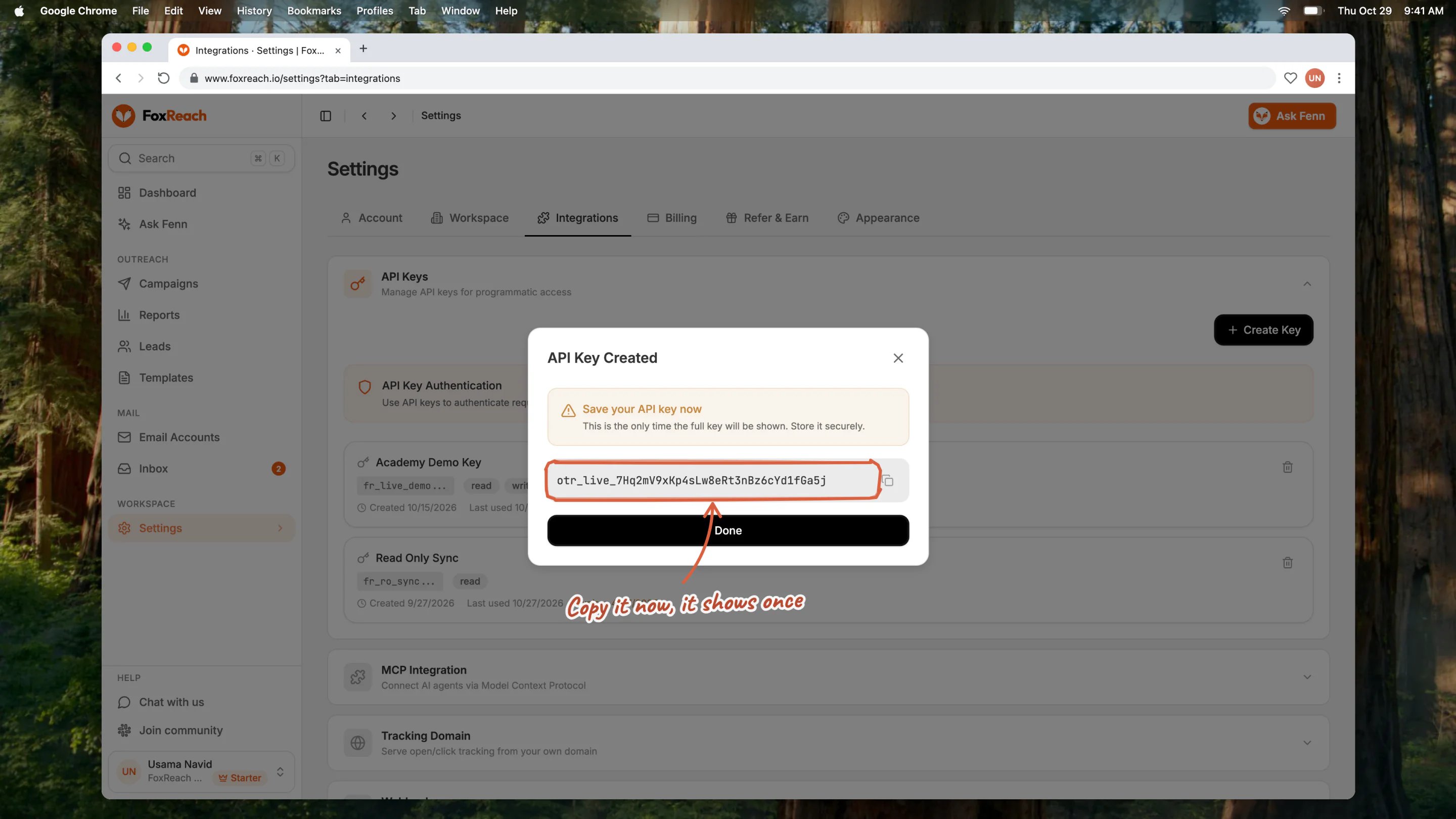
The API Key Created dialog in FoxReach, the one place the full otr_ key is shown
What You Can Do
Once installed, Claude uses the plugin automatically whenever you ask about FoxReach. Here are some examples:Manage Leads
“Show me all my active leads”
“Create a lead for jane@example.com - she’s the CTO at TechCorp”
“Update the lead cld_abc123 with company name ‘TechCorp Inc.’”
“How many leads do I have that bounced?”
Run Campaigns
“List all my active campaigns”
“Create a new campaign called Q1 Enterprise Outreach with a daily limit of 50”
“Pause the campaign cmp_xyz”
“What’s the reply rate on my Q1 campaign?”
Work with Templates
“Show me all my email templates”
“Create a template for SaaS founders - mention a pain point about manual lead management and pitch FoxReach as the solution”
Check Analytics
“Give me an overview of my outreach performance”
“What are the stats for campaign cmp_xyz?”
Read and Answer Replies
“Check my inbox for unread replies”
“Show me the conversation for rpl_abc123 and draft a reply”
“Mark the last three replies as interested”
Email Accounts and Webhooks
“List my email accounts and their health scores”
“Create a webhook that posts to https://example.com/hooks when a reply comes in”The skill covers every resource in the Python SDK: leads (including activity history), campaigns, sequences, templates, email accounts, inbox, webhooks, and analytics.
Invoking the Skill Directly
Claude picks the skill up on its own from the intent of your message, so most of the time you just ask. If you want to call it explicitly, the skill is registered asfoxreach and takes a resource, an action, and options:
How It Works
The plugin is a Claude Code skill made of three files:SKILL.md- the main skill: a quick reference of every SDK operation, common workflows (full campaign setup, performance checks, inbox triage, bulk lead creation), pagination, and error handlingapi-reference.md- the complete data types, endpoints, and field definitions Claude reads when it needs exact parametersexamples.md- working code examples for every operation
Combining with MCP
The Claude Code plugin works great alongside the FoxReach MCP server. Both expose the same set of operations (the MCP server publishes 64 tools across leads, campaigns, sequences, templates, email accounts, lead finder, tracking domains, warmup, managed mailboxes, analytics, and inbox), and those same tools power Fenn, the AI co-pilot inside the FoxReach app. The difference is how each one authenticates and which workspace it can reach:
To use both in Claude Code:
/mcp inside Claude Code to complete the FoxReach sign-in for the MCP server.
Example Workflow: Full Campaign Setup
Here’s a natural language conversation that sets up a complete campaign:You: Create 3 leads: sarah@techcorp.io (Sarah Chen, TechCorp, VP Engineering), mike@startupco.com (Mike Johnson, StartupCo, CEO), and lisa@enterprise.com (Lisa Wang, Enterprise Ltd, Head of Sales)
Claude: Created 3 leads successfully:
- cld_abc - sarah@techcorp.io
- cld_def - mike@startupco.com
- cld_ghi - lisa@enterprise.com
You: Now create a campaign called “Q1 Outreach” with a 3-step sequence. First email about their growth, follow-up after 3 days, and a final touch after 5 more days. Add those 3 leads and start it.
Claude: Here’s the plan: create the campaign, add three sequence steps (day 0, day 3, day 8), enroll the three leads, assign your sending account, and start it. Starting a campaign begins sending. Go ahead?
You: Yes.
Claude: Done! Here’s what I set up:That confirmation step before
- Campaign “Q1 Outreach” created (cmp_xyz)
- 3 sequence steps added (day 0, day 3, day 8)
- 3 leads enrolled
- Campaign is now active and sending
start is the skill’s guardrail at work: reads run immediately, anything that sends or deletes waits for a yes.
Troubleshooting
Claude says the SDK is not installed Runpip install foxreach in the same Python environment Claude Code uses, then ask again.
“Invalid API key” or authentication errors
Check that the key starts with otr_, that it has not been revoked under Settings > Integrations > API Keys, and that FOXREACH_API_KEY is exported in the shell where Claude Code is running.
Claude cannot find a lead or campaign you can see in the dashboard
API keys are scoped to one workspace. Make sure the key you gave Claude belongs to the workspace you are looking at.
Rate limit errors
The API allows 100 requests per minute. The SDK retries automatically after the wait the API asks for; for large bulk jobs, ask Claude to batch the work.
Resources
- GitHub repository
- FoxReach on PyPI
- MCP integration guide
- MCP server product page
- Python SDK documentation
- API reference
Frequently asked questions
How do I install the FoxReach plugin for Claude Code?
How do I install the FoxReach plugin for Claude Code?
Inside Claude Code, run /plugin marketplace add foxreach/foxreach-claude-plugin, then /plugin install foxreach@foxreach-marketplace. Install the FoxReach Python SDK with pip install foxreach, and give Claude an API key from Settings > Integrations > API Keys in your FoxReach dashboard. From then on, Claude picks the plugin up whenever you ask about leads, campaigns, or your inbox.
What is the difference between the Claude Code plugin and the FoxReach MCP server?
What is the difference between the Claude Code plugin and the FoxReach MCP server?
The plugin is a skill that runs the FoxReach Python SDK from your terminal with an API key, so it can target any workspace that key belongs to, including team workspaces. The MCP server is hosted by FoxReach, authenticates with a browser sign-in instead of a key, and is bound to your personal workspace. Both expose the same operations; pick the one that matches how you want to authenticate.
Does the plugin need an API key?
Does the plugin need an API key?
Yes. The plugin drives the FoxReach Python SDK, which authenticates with an otr_ API key sent in the X-API-Key header. Create one in the FoxReach dashboard under Settings > Integrations > API Keys, then either export it as FOXREACH_API_KEY or paste it into the conversation when Claude asks. The key is shown only once, so save it when it appears.
Will Claude delete or start things without asking?
Will Claude delete or start things without asking?
No. The skill tells Claude to confirm with you before destructive operations such as deleting a lead or starting a campaign, and to confirm the details before creating resources. Read-only requests like listing leads or checking analytics run straight away.