> ## Documentation Index
> Fetch the complete documentation index at: https://www.foxreach.io/docs/llms.txt
> Use this file to discover all available pages before exploring further.
# Send a single email from a campaign
> How to send one email to one lead from a FoxReach campaign: the Send Email drawer, the three places it opens from, preview text, what it counts against, and which leads it refuses.
Campaigns send sequences on a schedule. Sometimes you want the opposite: one email, to one person, now. A prospect replied "send me the deck" and you want to answer from the same inbox; a lead's first email bounced and you fixed the address; you want to nudge someone by hand without touching their sequence. That is what **Send Email** on a campaign is for.
It sends through one of the campaign's connected inboxes, so the email comes from the address the lead already knows, and it shows up in the lead's activity like any other send.
## Where to find it
Three places open the same drawer:
* **The campaign page.** Open a campaign and click **Send Email** in the header, next to Pause or Start. The lead field starts empty.
* **The campaign's Leads tab.** Select one lead in the list and choose the send action from the toolbar. The drawer opens with that lead filled in.
* **A lead's page.** On the lead's own page, each campaign the lead belongs to has a mail button that opens the drawer for that campaign.
It works whatever state the campaign is in: draft, active, paused or completed.
## The drawer
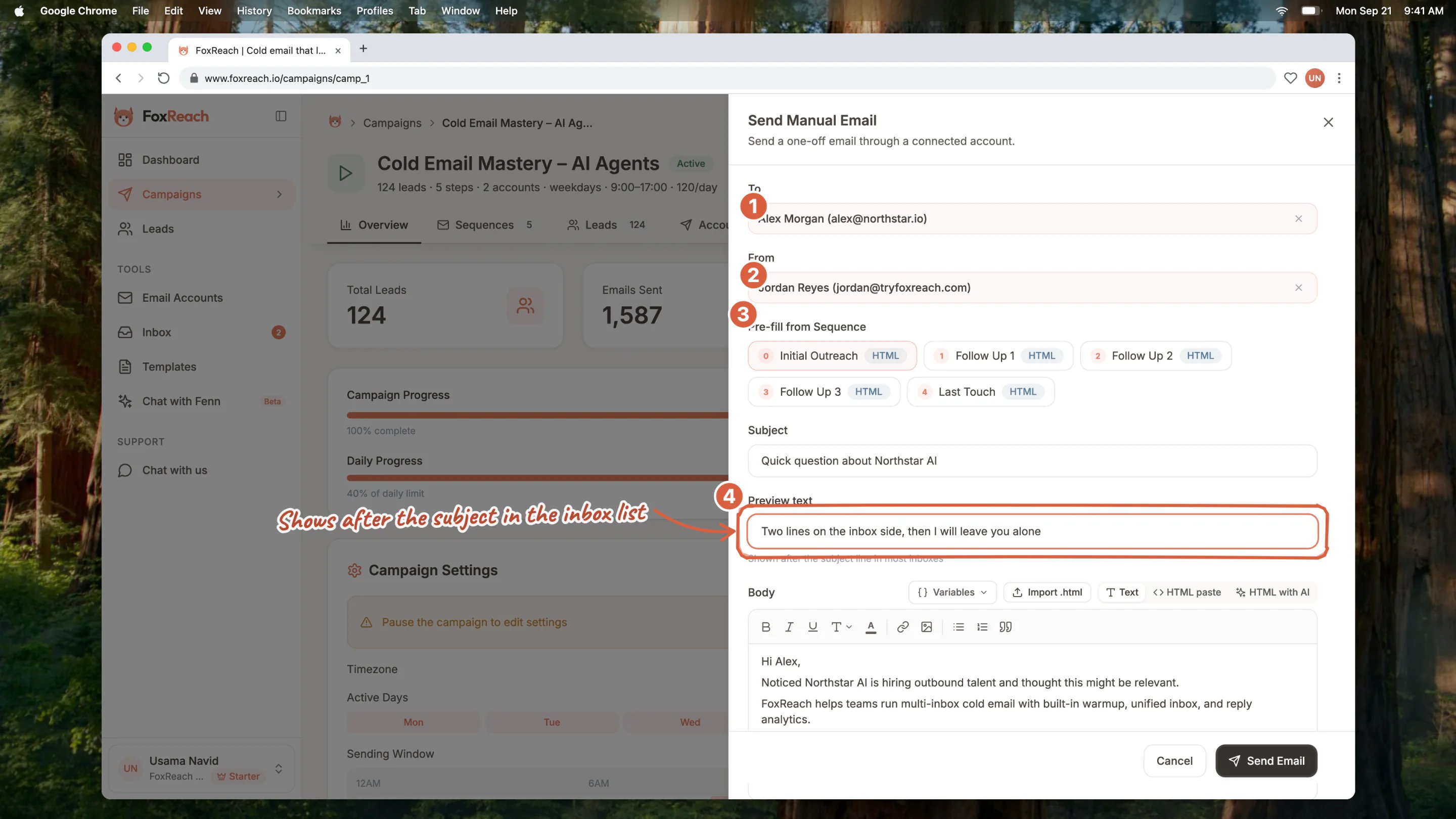
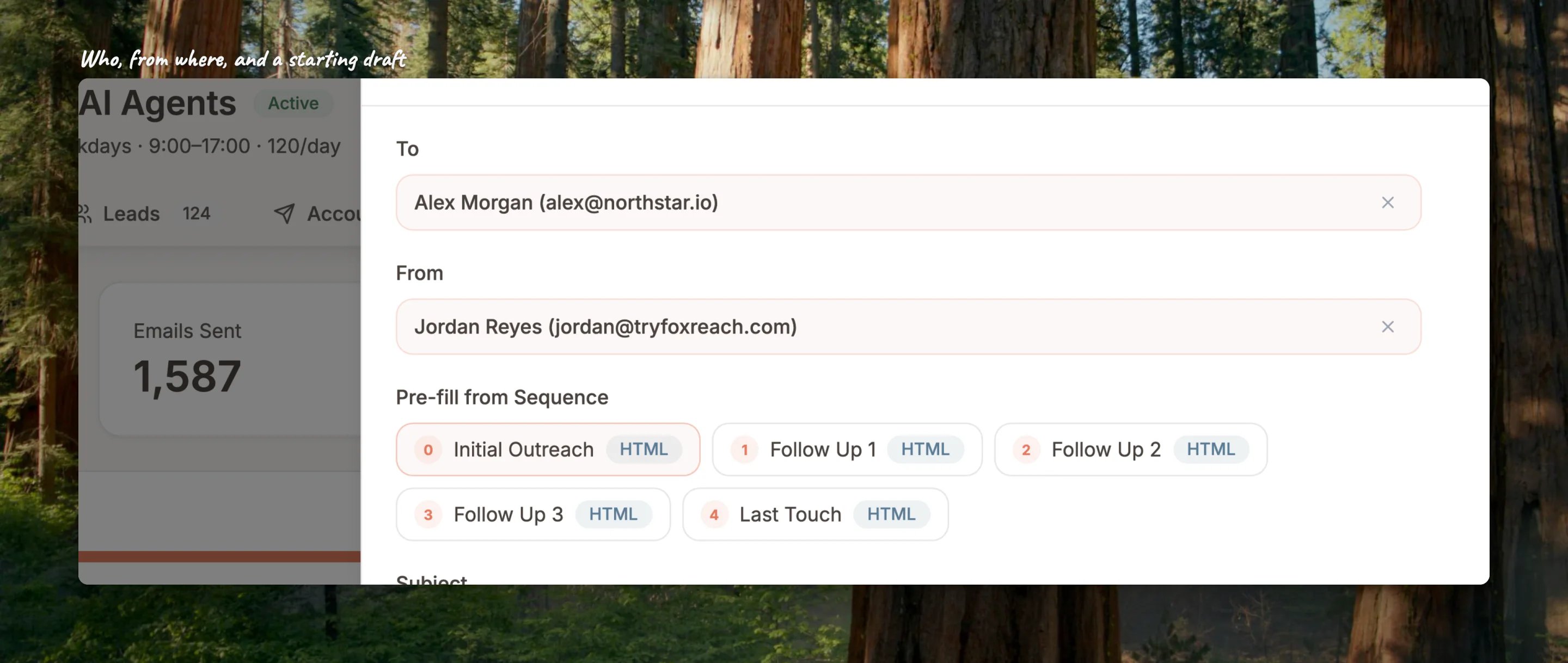 1. **To.** Search the campaign's leads by name, email or company and pick one.
2. **From.** Pick which of the campaign's inboxes sends it. Each shows how much of its daily limit it has used today, so you can spare one that is nearly full.
3. **Pre-fill from Sequence.** Optional. Click a step and its subject and body are copied into the form as a starting point, variables and all; they are filled in for the lead when you send.
4. **Subject and Preview text.** The preview text is the line most inboxes show after the subject in the message list. It only travels with HTML emails, so the drawer warns you if you fill it in with Send as HTML off.
5. **Body.** The same editor as a sequence step: Text, HTML paste, or HTML with AI, with the Variables menu and Import .html. Variables work exactly as they do in a sequence, including [custom fields](/docs/product/custom-fields) and fallbacks.
6. **Send as HTML.** On keeps formatting and links; off sends plain text.
Click **Send Email**. The email goes out straight away, not into the campaign's schedule.
## What it counts against
The send uses one of the inbox's daily sends and one of the workspace's monthly emails ([plans and billing](/docs/product/plans-and-billing) explains both). If the inbox is at its daily limit or the workspace is at its monthly limit, the drawer tells you and nothing is sent. Pick another inbox, or wait.
## Leads it will not email
FoxReach refuses the send, with a message saying why, when the lead is:
* **bounced**, because their address already failed;
* **unsubscribed**, because they asked not to be contacted (see [unsubscribes](/docs/product/unsubscribes));
* **marked bad by verification**, because the address is known not to exist.
These are the same guards the campaign itself applies before every scheduled send, so a one-off email can never go where the sequence would not.
## Good to know
* **It counts as contact in the campaign.** A lead you email by hand is marked as sent in that campaign. If you do this from a draft campaign and start it later, the sequence skips that lead's first step rather than emailing them twice.
* **Replies land in the unified inbox** like any other reply.
* **No unsubscribe header.** The one-click unsubscribe header goes on campaign sequence emails; a hand-sent email does not carry it, so include your own opt-out line if the message needs one.
## Related guides
* [Create a campaign](/docs/get-started/create-campaign)
* [Work the unified inbox](/docs/get-started/unified-inbox)
* [Custom fields](/docs/product/custom-fields)
* [Unsubscribes](/docs/product/unsubscribes)
## Frequently asked questions
The To field searches the campaign's leads. Add the person to the campaign first (Leads tab, Add Leads), or add them as a lead and then to the campaign, and they appear in the search.
No. The sequence keeps running on its schedule. The one thing that changes is that the lead is marked as sent in the campaign, which matters only for a campaign that has not started yet.
The lead is bounced, unsubscribed or failed verification. Open the lead's page to see which. A bounced or bad address needs correcting on the lead and re-verifying; an unsubscribed lead should stay that way.
Yes. The body and subject are rendered the same way as a sequence step, so variables, fallbacks and spin syntax all work.
1. **To.** Search the campaign's leads by name, email or company and pick one.
2. **From.** Pick which of the campaign's inboxes sends it. Each shows how much of its daily limit it has used today, so you can spare one that is nearly full.
3. **Pre-fill from Sequence.** Optional. Click a step and its subject and body are copied into the form as a starting point, variables and all; they are filled in for the lead when you send.
4. **Subject and Preview text.** The preview text is the line most inboxes show after the subject in the message list. It only travels with HTML emails, so the drawer warns you if you fill it in with Send as HTML off.
5. **Body.** The same editor as a sequence step: Text, HTML paste, or HTML with AI, with the Variables menu and Import .html. Variables work exactly as they do in a sequence, including [custom fields](/docs/product/custom-fields) and fallbacks.
6. **Send as HTML.** On keeps formatting and links; off sends plain text.
Click **Send Email**. The email goes out straight away, not into the campaign's schedule.
## What it counts against
The send uses one of the inbox's daily sends and one of the workspace's monthly emails ([plans and billing](/docs/product/plans-and-billing) explains both). If the inbox is at its daily limit or the workspace is at its monthly limit, the drawer tells you and nothing is sent. Pick another inbox, or wait.
## Leads it will not email
FoxReach refuses the send, with a message saying why, when the lead is:
* **bounced**, because their address already failed;
* **unsubscribed**, because they asked not to be contacted (see [unsubscribes](/docs/product/unsubscribes));
* **marked bad by verification**, because the address is known not to exist.
These are the same guards the campaign itself applies before every scheduled send, so a one-off email can never go where the sequence would not.
## Good to know
* **It counts as contact in the campaign.** A lead you email by hand is marked as sent in that campaign. If you do this from a draft campaign and start it later, the sequence skips that lead's first step rather than emailing them twice.
* **Replies land in the unified inbox** like any other reply.
* **No unsubscribe header.** The one-click unsubscribe header goes on campaign sequence emails; a hand-sent email does not carry it, so include your own opt-out line if the message needs one.
## Related guides
* [Create a campaign](/docs/get-started/create-campaign)
* [Work the unified inbox](/docs/get-started/unified-inbox)
* [Custom fields](/docs/product/custom-fields)
* [Unsubscribes](/docs/product/unsubscribes)
## Frequently asked questions
The To field searches the campaign's leads. Add the person to the campaign first (Leads tab, Add Leads), or add them as a lead and then to the campaign, and they appear in the search.
No. The sequence keeps running on its schedule. The one thing that changes is that the lead is marked as sent in the campaign, which matters only for a campaign that has not started yet.
The lead is bounced, unsubscribed or failed verification. Open the lead's page to see which. A bounced or bad address needs correcting on the lead and re-verifying; an unsubscribed lead should stay that way.
Yes. The body and subject are rendered the same way as a sequence step, so variables, fallbacks and spin syntax all work.