> ## Documentation Index
> Fetch the complete documentation index at: https://www.foxreach.io/docs/llms.txt
> Use this file to discover all available pages before exploring further.
# Check cold email copy for spam triggers and typos before you send
> How to run Copy check on a sequence step, A/B variant or template in FoxReach: what the inbox score and folder prediction mean, how to read the highlighted sentences and words, and how to apply the fixes it offers with one click.
By the end of this guide you will have run Copy check on a draft, read its inbox score and the folder it predicts, cut the sentences it flagged, fixed the words it underlined, and re-checked to watch the score climb. It takes about a minute per draft, and it is free: a check does not use AI credits.
## What Copy check is
Under every subject and body editor in FoxReach, on sequence steps, A/B variants and email templates, there is a panel called Copy check. Click Check copy and FoxReach sends the subject and body to a decision model that judges cold email the way Gmail's and Outlook's filters and a busy reader do. It answers with:
* **An inbox score from 0 to 100** and a label: Should land, Mostly fine, Borderline, or Likely filtered.
* **The folder it predicts** for the email as written: Primary inbox, Promotions, or Spam, with how sure it is.
* **Signals**, the overall problems it sees: Reads like a pitch, False urgency, Generic opener, Not tailored to the reader, Too long, No single clear ask, Looks like a template blast.
* **Sentences to cut or rewrite**, highlighted in the text with the reason (spam trigger, salesy, false urgency, formatting, link, generic, too long, grammar).
* **Words that are misspelled or wrong**, underlined, with a one-click replacement when there is a clear one (their and there, your and you're, its and it's, and common misspellings).
It is advisory. Nothing in it blocks a save or a send. Use it the way you would use a colleague reading over your shoulder: it catches what you stopped seeing on the fifth read.
## Step 1: Open a step and find the panel
Open a campaign, go to the Sequences tab and click the edit control on a step. Under the body editor, below the Inbox placement hints, is the Copy check panel with a Check copy button.
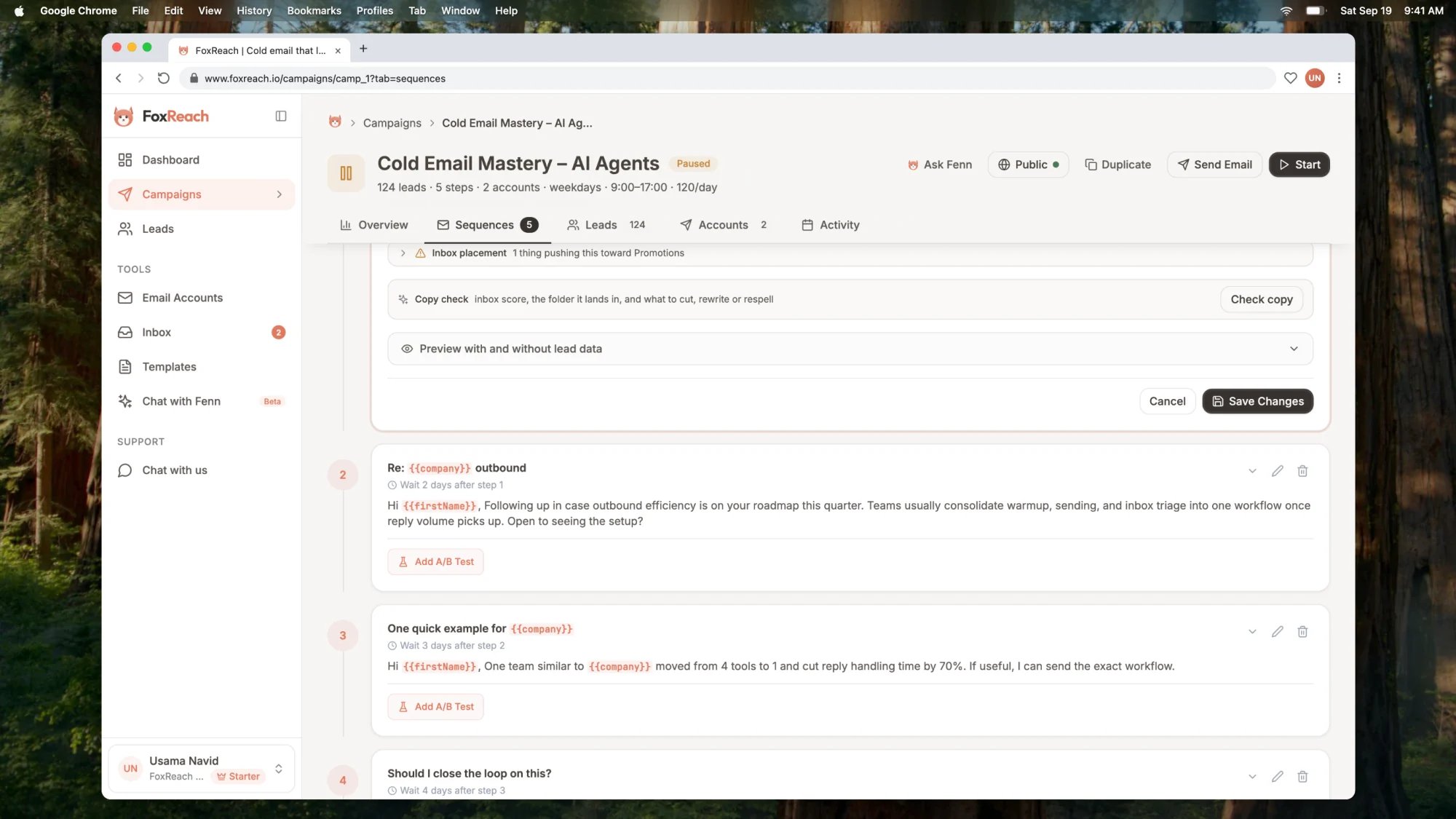 The same panel sits under A/B variants and under the body in the template editor, so you can check copy wherever you write it. Sequence steps are locked while a campaign is active, so pause first if you want to edit a live campaign; checking works either way.
Write, or paste, the draft first. The button is disabled while both the subject and body are empty.
## Step 2: Check the copy
Click Check copy. The verdict appears in a second or two.
The same panel sits under A/B variants and under the body in the template editor, so you can check copy wherever you write it. Sequence steps are locked while a campaign is active, so pause first if you want to edit a live campaign; checking works either way.
Write, or paste, the draft first. The button is disabled while both the subject and body are empty.
## Step 2: Check the copy
Click Check copy. The verdict appears in a second or two.
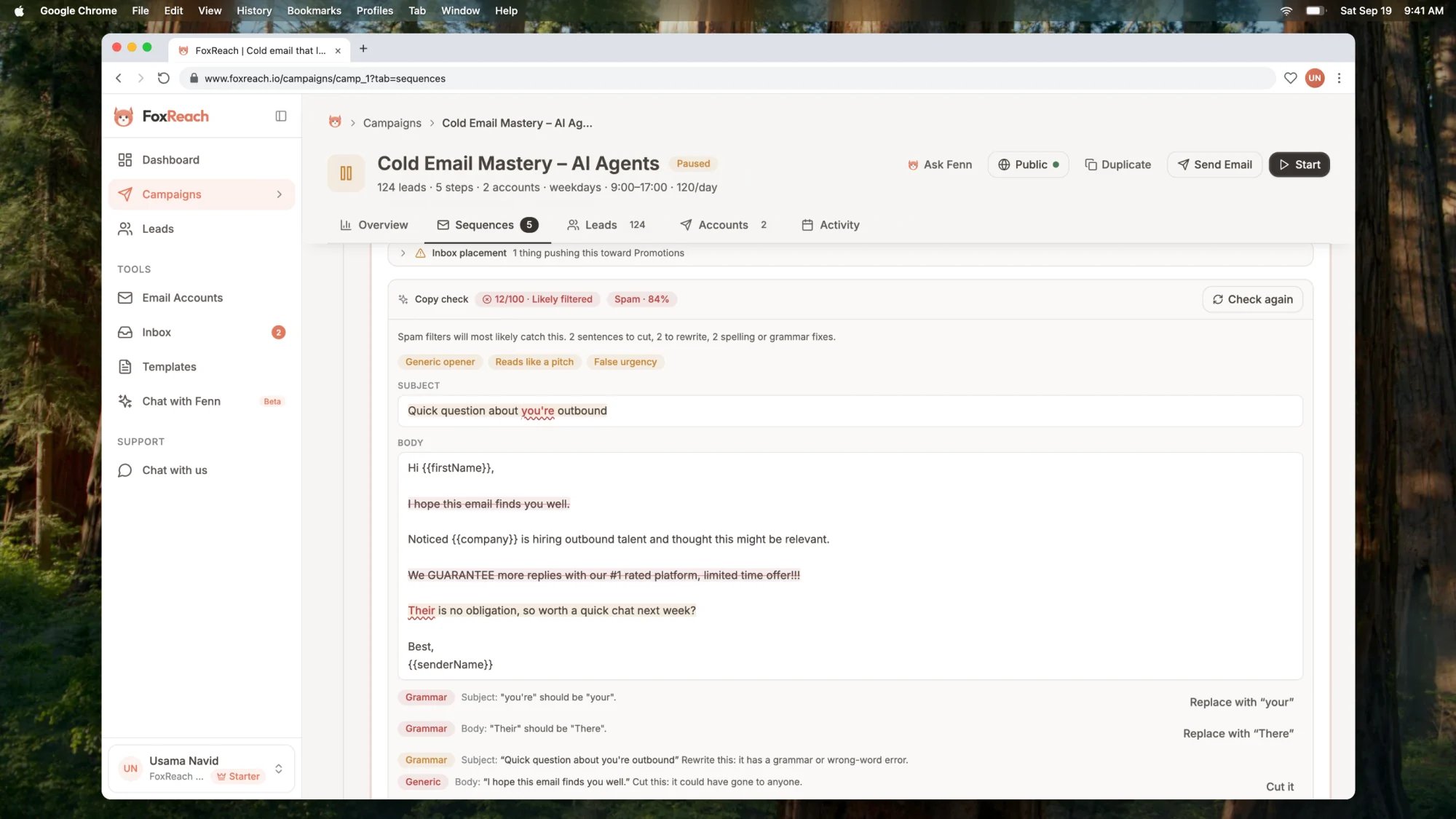 Read it top to bottom:
**The score and the folder.** The first badge is the score and its label; the second is the predicted folder and the confidence behind it. A draft scoring under 35 with a Spam prediction has filter triggers in it. One scoring 60 to 80 will mostly land but carries avoidable risk. Above 80 reads like a short personal note.
**The summary line.** One sentence on the overall read, then a count of what to change: sentences to cut, sentences to rewrite, spelling or grammar fixes.
**The signals.** These are problems with the email as a whole rather than with one sentence. Reads like a pitch means the email sells before it earns attention. Generic opener means it starts with filler that could go to anyone. Not tailored to the reader means nothing in it is specific to this person or company. Fix these by rewriting, not by deleting a line.
**The highlighted text.** The subject and body are shown as the reader will see them, with personalization variables left in place. A sentence with a red strike-through is one to cut. A sentence with an amber background is one to rewrite. A word with a red wavy underline is misspelled or the wrong word. Hover any highlight for the reason.
**The fix list.** Every highlight has a row underneath with its category, the text, the reason, and, where FoxReach can do it for you, a button.
## Step 3: Apply the fixes
Two kinds of fixes apply with one click:
* **Replace with "…"** swaps a wrong word for the right one, in the subject or in the body, without touching anything else. FoxReach only offers this when the correction is unambiguous. A misspelling it cannot resolve to one word is flagged with "check the spelling of" and left to you.
* **Cut it** deletes a flagged sentence from the editor. Sentences marked rewrite have no button, because the point is to say the same thing differently, and that is yours to write.
Each applied fix edits the draft and updates the highlighted text in the panel, so the remaining fixes stay in place and you can apply them one after another. The header keeps count and the button changes to Re-check.
If the editor has split a sentence across formatting (a line break in the middle, bold on one word), Cut it tells you it could not find the sentence and leaves the draft alone. Make that edit by hand.
Type anything into the editor yourself and the panel shows "edited since this check", since the verdict no longer describes what is in the draft.
## Step 4: Re-check
Click Re-check. The same draft, now with the cuts and corrections in it, gets a fresh verdict.
Read it top to bottom:
**The score and the folder.** The first badge is the score and its label; the second is the predicted folder and the confidence behind it. A draft scoring under 35 with a Spam prediction has filter triggers in it. One scoring 60 to 80 will mostly land but carries avoidable risk. Above 80 reads like a short personal note.
**The summary line.** One sentence on the overall read, then a count of what to change: sentences to cut, sentences to rewrite, spelling or grammar fixes.
**The signals.** These are problems with the email as a whole rather than with one sentence. Reads like a pitch means the email sells before it earns attention. Generic opener means it starts with filler that could go to anyone. Not tailored to the reader means nothing in it is specific to this person or company. Fix these by rewriting, not by deleting a line.
**The highlighted text.** The subject and body are shown as the reader will see them, with personalization variables left in place. A sentence with a red strike-through is one to cut. A sentence with an amber background is one to rewrite. A word with a red wavy underline is misspelled or the wrong word. Hover any highlight for the reason.
**The fix list.** Every highlight has a row underneath with its category, the text, the reason, and, where FoxReach can do it for you, a button.
## Step 3: Apply the fixes
Two kinds of fixes apply with one click:
* **Replace with "…"** swaps a wrong word for the right one, in the subject or in the body, without touching anything else. FoxReach only offers this when the correction is unambiguous. A misspelling it cannot resolve to one word is flagged with "check the spelling of" and left to you.
* **Cut it** deletes a flagged sentence from the editor. Sentences marked rewrite have no button, because the point is to say the same thing differently, and that is yours to write.
Each applied fix edits the draft and updates the highlighted text in the panel, so the remaining fixes stay in place and you can apply them one after another. The header keeps count and the button changes to Re-check.
If the editor has split a sentence across formatting (a line break in the middle, bold on one word), Cut it tells you it could not find the sentence and leaves the draft alone. Make that edit by hand.
Type anything into the editor yourself and the panel shows "edited since this check", since the verdict no longer describes what is in the draft.
## Step 4: Re-check
Click Re-check. The same draft, now with the cuts and corrections in it, gets a fresh verdict.
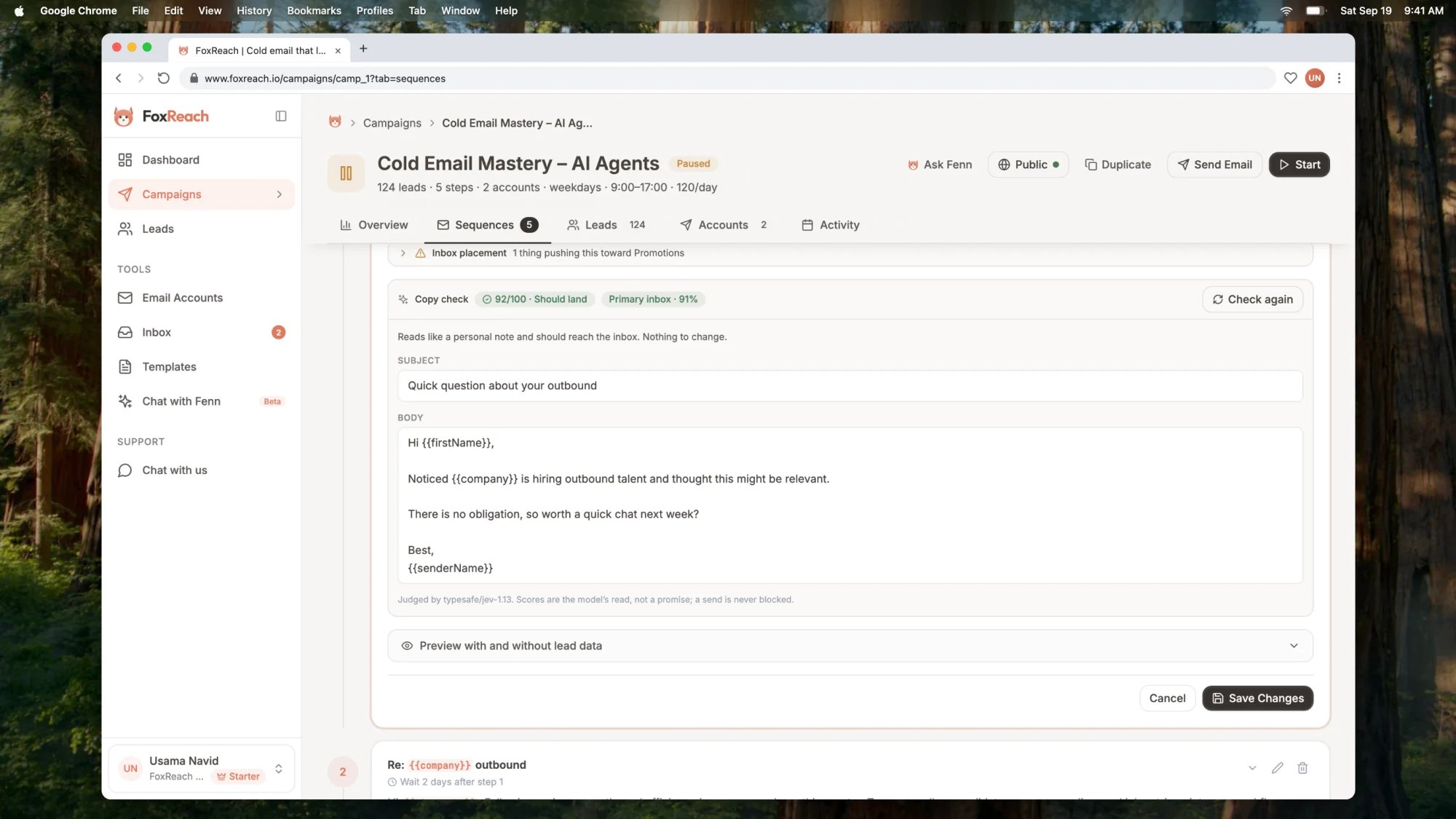 Keep going until the score is where you want it and the fix list is empty. Then save the step.
## What it catches, and what it does not
Copy check is tuned for one-to-one cold email sent from a real person's mailbox, not for newsletters or designed HTML. It weighs the things Gmail's Promotions and spam classifiers weigh, and the things a busy reader gives up on:
| It flags | Examples |
| ---------------------------------- | ----------------------------------------------------------- |
| Spam trigger words and patterns | free, guarantee, act now, no obligation, 100%, \$\$\$ |
| Hype and pitch-first phrasing | #1, leading, best-in-class, a pitch before any relevance |
| False urgency | limited time, before it's gone, a deadline that is not real |
| Formatting that looks like a blast | ALL CAPS, runs of exclamation marks, emoji |
| Links | bare or shortened URLs, "click here" |
| Generic filler | I hope this email finds you well |
| Length | more than a busy reader will finish |
| Spelling and grammar | real typos, their and there, your and you're, its and it's |
It does not flag personalization variables like `{{first_name}}` or spin syntax like `{Hi|Hello}`; both are template syntax it understands. It does not flag British against American spelling, product names or a casual tone. And it does not judge your list, your sending volume or your domain reputation, which decide inbox placement at least as much as the words do. The [deliverability guide](https://www.foxreach.io/blog/cold-email-deliverability) covers those.
## Practical notes
**Free, on every plan.** Copy check does not use AI credits, so check as often as you like. Fenn and the HTML generator still draw from the monthly credit pool; see the [pricing page](https://www.foxreach.io/pricing) for what each plan includes.
**Check before you A/B test.** A variant that scores 30 against a control that scores 85 is not a fair test of the idea, it is a test of the spam filter. Get both variants into the same band first, then let the [A/B test](/docs/product/ab-testing) tell you which idea wins.
**Templates too.** The panel is in the template editor, so a template can be checked once and loaded into steps clean. Checking a template checks it as a first-touch email.
**The score is the model's read, not a promise.** Two identical drafts can land differently on two lists. Use the score to remove obvious risk and compare drafts, and use reply rate, the number that actually pays, to judge the campaign.
## Frequently asked questions
It sends the subject and body to a decision model that answers a fixed set of typed questions: where the email will most likely land, how likely it is to reach the Primary inbox on a five-step scale, whether each overall problem is present, and for every sentence whether to keep, cut or rewrite it and why. The score is the probability-weighted position on that scale. The model returns probabilities, not prose, so the panel assembles the summary line from its answers.
No. It cuts sentences and replaces individual wrong words on your say-so, and it tells you which sentences to rewrite and why, but the rewriting is yours. If you want a draft written or reworked, ask Fenn, the AI co-pilot, and then run Copy check on the result.
Replacements are only offered when the correction is unambiguous: a known confusion pair such as their and there, or a common misspelling with one right answer. A word the model judges wrong but cannot resolve to a single correction is flagged as "check the spelling of" and left to you.
No. The score covers the words. Inbox placement also depends on your domain and mailbox reputation, warmup, sending volume and pace, list quality and bounces. A clean draft on a bad list still lands in spam. Copy check removes the part of the risk that lives in the copy.
Yes. It reads the text of the email as a reader would see it and judges that. Sending as HTML is itself a placement factor, which the Inbox placement hints above the panel already point out, so the two panels together cover both the copy and the format.
Keep going until the score is where you want it and the fix list is empty. Then save the step.
## What it catches, and what it does not
Copy check is tuned for one-to-one cold email sent from a real person's mailbox, not for newsletters or designed HTML. It weighs the things Gmail's Promotions and spam classifiers weigh, and the things a busy reader gives up on:
| It flags | Examples |
| ---------------------------------- | ----------------------------------------------------------- |
| Spam trigger words and patterns | free, guarantee, act now, no obligation, 100%, \$\$\$ |
| Hype and pitch-first phrasing | #1, leading, best-in-class, a pitch before any relevance |
| False urgency | limited time, before it's gone, a deadline that is not real |
| Formatting that looks like a blast | ALL CAPS, runs of exclamation marks, emoji |
| Links | bare or shortened URLs, "click here" |
| Generic filler | I hope this email finds you well |
| Length | more than a busy reader will finish |
| Spelling and grammar | real typos, their and there, your and you're, its and it's |
It does not flag personalization variables like `{{first_name}}` or spin syntax like `{Hi|Hello}`; both are template syntax it understands. It does not flag British against American spelling, product names or a casual tone. And it does not judge your list, your sending volume or your domain reputation, which decide inbox placement at least as much as the words do. The [deliverability guide](https://www.foxreach.io/blog/cold-email-deliverability) covers those.
## Practical notes
**Free, on every plan.** Copy check does not use AI credits, so check as often as you like. Fenn and the HTML generator still draw from the monthly credit pool; see the [pricing page](https://www.foxreach.io/pricing) for what each plan includes.
**Check before you A/B test.** A variant that scores 30 against a control that scores 85 is not a fair test of the idea, it is a test of the spam filter. Get both variants into the same band first, then let the [A/B test](/docs/product/ab-testing) tell you which idea wins.
**Templates too.** The panel is in the template editor, so a template can be checked once and loaded into steps clean. Checking a template checks it as a first-touch email.
**The score is the model's read, not a promise.** Two identical drafts can land differently on two lists. Use the score to remove obvious risk and compare drafts, and use reply rate, the number that actually pays, to judge the campaign.
## Frequently asked questions
It sends the subject and body to a decision model that answers a fixed set of typed questions: where the email will most likely land, how likely it is to reach the Primary inbox on a five-step scale, whether each overall problem is present, and for every sentence whether to keep, cut or rewrite it and why. The score is the probability-weighted position on that scale. The model returns probabilities, not prose, so the panel assembles the summary line from its answers.
No. It cuts sentences and replaces individual wrong words on your say-so, and it tells you which sentences to rewrite and why, but the rewriting is yours. If you want a draft written or reworked, ask Fenn, the AI co-pilot, and then run Copy check on the result.
Replacements are only offered when the correction is unambiguous: a known confusion pair such as their and there, or a common misspelling with one right answer. A word the model judges wrong but cannot resolve to a single correction is flagged as "check the spelling of" and left to you.
No. The score covers the words. Inbox placement also depends on your domain and mailbox reputation, warmup, sending volume and pace, list quality and bounces. A clean draft on a bad list still lands in spam. Copy check removes the part of the risk that lives in the copy.
Yes. It reads the text of the email as a reader would see it and judges that. Sending as HTML is itself a placement factor, which the Inbox placement hints above the panel already point out, so the two panels together cover both the copy and the format.